
KoboldCpp is one file. There is no installer. Pick your system, then click the file for your graphics card. Not sure which card you have? See below. Every link goes to the latest official release on GitHub.
NVIDIA graphics cardkoboldcpp.exe
AMD or Intel graphics, or nonekoboldcpp-nocuda.exe, a much smaller download
Older PCkoboldcpp-oldpc.exe, for older devices, if the others crash at start
NVIDIA graphics cardkoboldcpp-linux-x64
AMD or Intel graphics, or nonekoboldcpp-linux-x64-nocuda, a much smaller download
Older PCkoboldcpp-linux-x64-oldpc, if the others crash at start
Apple Silicon (M-series)koboldcpp-mac-arm64
Intel Macs have no ready-made file. See Build from source.
Which graphics card do I have?
Section titled “Which graphics card do I have?”On Windows, the Task Manager shows it.
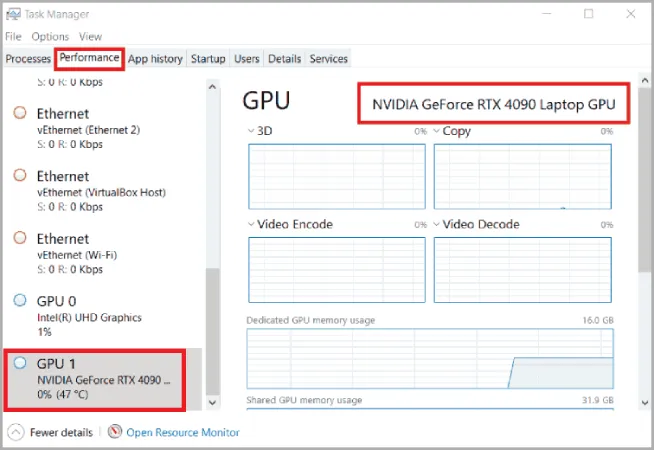
- Launch Windows Task Manager with keyboard shortcut Ctrl+Alt+Del or Ctrl+Shift+Esc.
- Click Performance tab.
- Click GPU in the list on the left. The card's name is at the top right. Dedicated GPU memory is the card's own memory, its VRAM. It determines what models work well for your system.
On Linux, lspci | grep -iE 'vga|3d' shows the card's name, and nvidia-smi shows an NVIDIA card's memory. On a Mac with Apple Silicon, the graphics chip uses the Mac's main memory.
Pick the download suited to your system and GPU card.
All files and what each contains: Release files and system requirements.